Punch lists · Snag lists · Defect tracking
PUNCH ZERO
The punch list & snagging app for contractors and site inspections.
Capture defects, photograph and mark up snags, assign trades and generate PDF punch lists — from your phone or any browser. Built for sites, not spreadsheets.
iOS coming soon
Built for the job
Everything the site inspector needs. Nothing they don't.
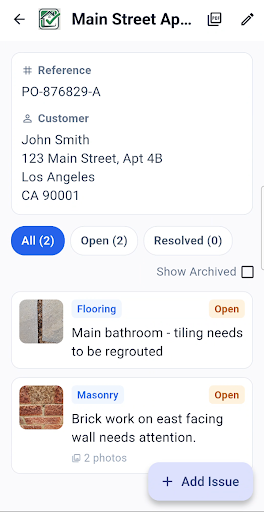
Punch Zero replaces clipboards, camera rolls and spreadsheets with one defect tracking app. Every snag gets its photo, location, trade and status in one place — so your construction punch list is ready to send the moment you finish the walk-round.
Capture in seconds
Photograph defects on site and dictate notes by voice. Tag a trade category and move on — before the scaffold moves.
Organised by project
Every site has its own workspace. Filter by trade, category or status — you always know exactly where things stand.
Professional reports
One tap produces a clean PDF punch list ready to send to contractors, clients, or archive for your records.
Synced everywhere
Start on Android, review in any browser. Your data is always current and always backed up to the cloud.
How it works
From site walk-round to PDF punch list in four steps.
The same simple workflow whether you're closing out a commercial fit-out or snagging a new build home.
-
Create a project
Add the site or property with its name, reference and customer details, plus a few project photos for context.
-
Log defects as you walk
Photograph each snag and mark it up — draw, circle or box the problem in colour. Dictate the note by voice and tag the trade: Flooring, Masonry, Carpentry, General and more.
-
Track and resolve
Every issue is Open or Resolved, with the date raised and date resolved recorded. Archive what's done and keep the list focused on what's left.
-
Send a PDF report
One tap builds a PDF punch list report. Filter it by trade, include or leave out resolved and archived items, then share it by email, WhatsApp and more.
See it in action
Designed for the way you actually work on site.
Issue list
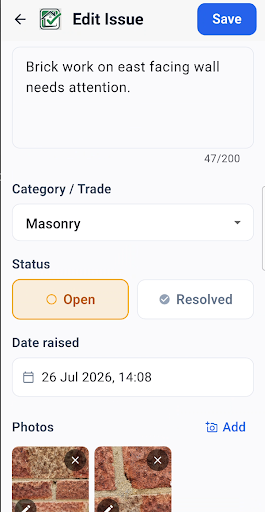
Defect detail
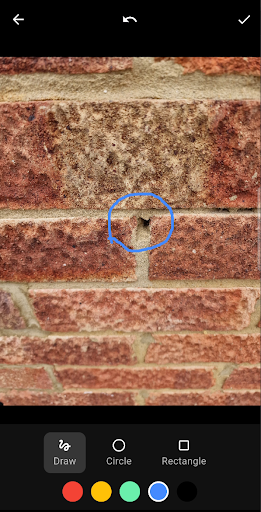
Photo annotation
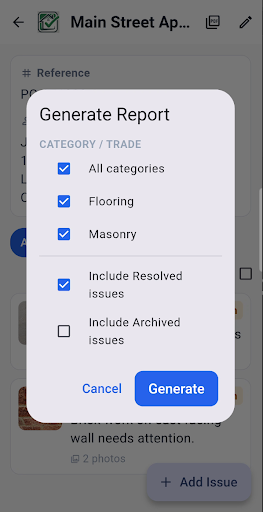
Generate report
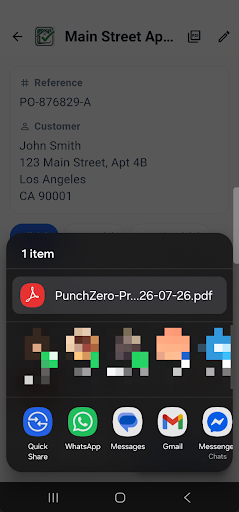
Share PDF
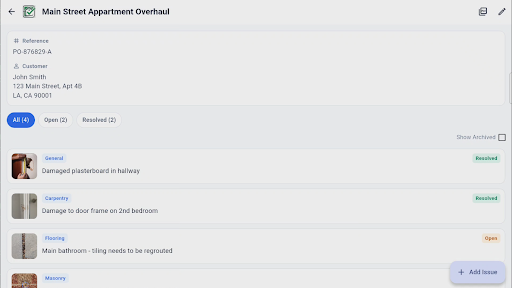
Tablet — issue list
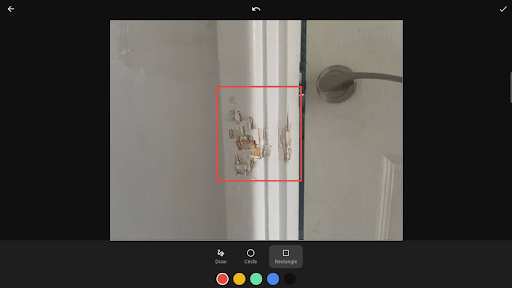
Tablet — annotation
Who it's for
One snag list app for everyone who signs off a building.
Call it a punch list or a snag list — if you need to record defects, get them fixed and prove they're done, Punch Zero fits the way you work.
Contractors & builders
Keep on top of snagging across every job you're running. Log defects as you walk the site, tag the responsible trade, and send each subcontractor a PDF punch list filtered to their work. Clear photos with the problem circled mean fewer return visits and fewer phone calls — and a faster route to handover and final payment.
Construction punch list checklist →Site managers & inspectors
Run site inspections and pre-handover walk-rounds from your phone, even where there's no signal. Every item carries its own annotated photos, notes, trade and status, with the date raised and date resolved, so you have a tidy audit trail when the client or contract administrator asks what's outstanding.
What makes a good punch list →Property developers & landlords
Set up a project for each plot, unit or property with its own reference and customer details. Track defects across a development, check that snags are closed out before a buyer or tenant moves in, and keep a dated record of what was fixed and when.
Free punch list template →Homeowners snagging a new build
Buying a new build home? Walk it room by room, photograph each snag and mark it up so your builder knows exactly what you mean. Send their customer care team a clear PDF snag list, then tick items off as they're fixed during the warranty period.
New build snagging checklist →Simple pricing
Try it free. Then one simple plan.
Every feature, unlimited projects, issues and photos — no tiers to compare.
Punch Zero Pro
Then one simple monthly subscription
- Unlimited projects
- Unlimited issues
- Unlimited photos
- PDF punch list reports
- Photo capture & annotation
- Voice notes
- Real-time cloud sync across devices
Payment details are required to start your trial — you won't be charged until it ends. Manage or cancel your subscription at any time from the app or web portal.
Free guides & templates
Punch list and snagging resources.
Practical checklists and a printable template you can use today — with or without the app.
FAQ
Frequently asked questions.
What is a punch list?
A punch list is a list of defects and unfinished work that need to be put right before a construction project is accepted as complete and handed over. Each item records where the problem is, what is wrong, which trade is responsible, and whether it has been fixed. Read more in our guide: What is a punch list?
What's the difference between a punch list and a snag list?
There's no real difference — they're the same document under different names. "Punch list" is the usual term in the US, while "snag list" (and "snagging", for the inspection itself) is the usual term in the UK and Ireland. Punch Zero works for both.
Can I export my snag list to PDF?
Yes. One tap generates a PDF report for a project. You can filter it by trade or category and choose whether to include resolved or archived issues, then share it by email, WhatsApp or any other app on your device. Prefer paper? Try our free printable punch list template.
Does Punch Zero work offline?
Yes. You can keep logging defects without signal — useful in basements, plant rooms and new estates. Photos are saved on your device straight away and upload automatically when you're back online.
Can I use Punch Zero on a computer?
Yes. The web app at app.punchzero.org runs in any modern browser on a laptop or desktop, and syncs with the Android app, so you can capture defects on site and review them in the office.
Is there an iPhone version?
An iOS app is coming soon. In the meantime, iPhone and iPad users can use the Punch Zero web app in Safari or any other browser.
Is there a free trial?
Yes. Punch Zero is free to download and starts with a 7-day free trial. After that there's one simple monthly plan, Punch Zero Pro, with every feature included. You can cancel at any time.
Can homeowners use Punch Zero to snag a new build?
Yes. Create a project for your new home, walk it room by room, photograph and mark up each snag, then send your builder a clear PDF snag list. Our free new build snagging checklist tells you what to look for in every room.